
Mac Mini Setup Mistakes to Avoid (2026)
Mac mini setup mistakes to avoid are more important than buying expensive gear. One wrong decision can ruin your entire clean desk setup.

Most users don’t fail because of budget—they fail because of poor decisions. In this guide, we’ll break down the most common Mac mini setup mistakes to avoid so you can build a clean, powerful, and efficient workspace.
Why Mac Mini Setup Mistakes to Avoid Matter More Than Gear
Avoiding Mac mini setup mistakes to avoid is more important than upgrading hardware. A bad monitor, messy cables, or poor layout can destroy your experience—even if you have powerful hardware.
❌ Wrong Setup Choices
Choosing the wrong components leads to poor usability
✔ Smart Decisions
Avoiding mistakes improves performance instantly
💰 Save Money
Avoid wasting money on unnecessary upgrades
✨ Clean Setup
Better aesthetics and productivity
👉 Related: Clean Mac Mini Setup Under ₹1 Lakh
👉 Upgrade: Best Mac Mini Accessories
👉 Learn more from Apple Official Mac Mini Guide

Mac Mini Setup Mistakes to Avoid: Choosing the Wrong Monitor
One of the biggest Mac mini setup mistakes to avoid is choosing the wrong monitor. Many users buy a cheap 1080p display, which limits the overall experience and reduces visual clarity.
- 1080p looks less sharp on macOS
- Poor color accuracy affects work and media
- Low refresh rate reduces smoothness
- Bad panel quality impacts viewing angles
🖥️ Why This Is a Problem
macOS is optimized for higher-resolution displays. A low-resolution monitor can make text look blurry and reduce the premium feel of your setup.
⚡ Better Choice
A 1440p or higher resolution monitor with IPS panel and good color accuracy (sRGB 99%) provides a much better experience.
👉 Related: Best Monitor Setup for Mac Mini
👉 Learn more: Apple Display Recommendations
👍 Fix This Mistake
- Choose at least 1440p resolution
- Prefer IPS panel for better colors
- Check refresh rate (75Hz or higher)
- Look for HDR and color accuracy
👎 Common Mistake
- Buying cheapest 1080p monitor
- Ignoring panel quality
- Not checking macOS scaling compatibility

Mac Mini Setup Mistakes to Avoid: Ignoring External Storage
Another major Mac mini setup mistakes to avoid is relying only on internal storage. Many users underestimate how quickly storage fills up, especially with apps, media files, and backups.
- Internal storage fills up very quickly
- macOS performance slows down when storage is full
- Large files (videos, apps) consume space fast
- Cloud storage is not always reliable or fast
💾 Why This Is a Problem
macOS requires free space to function smoothly. When storage is nearly full, system performance drops and everyday tasks become slower.
⚡ Better Solution
Using an external SSD is the best solution. It expands your storage, improves workflow efficiency, and allows you to store large files without affecting system performance.
👉 Recommended: Best External SSD for Mac Mini
👉 Learn more: How macOS Storage Works
👍 Fix This Mistake
- Use a fast external SSD (at least 1TB)
- Keep system storage at least 20% free
- Store large files externally
- Use SSD for backups and media
👎 Common Mistake
- Buying base storage Mac mini and ignoring upgrades
- Relying only on cloud storage
- Letting storage reach full capacity
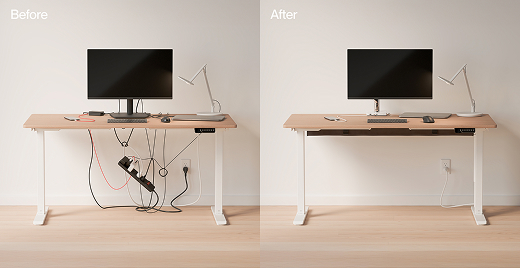
Mac Mini Setup Mistakes to Avoid: Messy Cable Management
One of the most common Mac mini setup mistakes to avoid is ignoring cable management. Even with premium devices, messy cables can make your setup look cluttered and unprofessional.
- Cables scattered across the desk
- Tangled wires behind the monitor
- No proper routing or organization
- Visible clutter reducing aesthetic appeal
🧹 Why This Is a Problem
Messy cables not only look bad but also make your workspace harder to use. It becomes difficult to manage devices, clean your desk, or make quick adjustments.
✨ Clean Setup Impact
A clean desk setup is defined by how well cables are managed. Proper cable organization instantly improves both aesthetics and usability.
⚡ Better Solution
Using cable clips, sleeves, and under-desk routing solutions can completely transform your setup into a clean and distraction-free workspace.
👉 Recommended: Best Cable Management Accessories
👉 Learn more: How to Manage Desk Cables Properly
👍 Fix This Mistake
- Use cable clips for routing wires
- Hide cables behind desk or under surface
- Use velcro ties to bundle cables
- Keep only necessary cables visible
👎 Common Mistake
- Ignoring cable management completely
- Using too many visible wires
- No planning for cable routing

Mac Mini Setup Mistakes to Avoid: Overspending on Unnecessary Gear
One of the most overlooked Mac mini setup mistakes to avoid is overspending on accessories that don’t actually improve your workflow. Many users assume that a more expensive setup automatically means a better experience.
- Buying premium gear without real need
- Choosing aesthetics over functionality
- Overspending on RGB or unnecessary extras
- Ignoring actual productivity requirements
💰 Why This Is a Problem
Spending more does not guarantee a better setup. In many cases, it leads to wasted budget and clutter without improving performance or usability.
⚡ Smarter Approach
Focus on essential upgrades that actually improve your workflow—like storage, connectivity, and ergonomics—before spending on premium accessories.
👉 Smart Setup: Clean Mac Mini Setup Under ₹1 Lakh
👉 Upgrade wisely: Essential Mac Mini Accessories Only
👉 Learn more: Understanding Opportunity Cost
👍 Fix This Mistake
- Prioritize essential upgrades first
- Set a clear budget before buying
- Focus on usability, not hype
- Upgrade gradually instead of all at once
👎 Common Mistake
- Buying everything at once
- Following trends without research
- Choosing expensive gear without purpose

Mac Mini Setup Mistakes to Avoid: Poor Desk Layout
A common but ignored Mac mini setup mistakes to avoid is poor desk layout. Even with good accessories, a bad layout can reduce comfort, productivity, and overall experience.
- Monitor placed too low or too high
- Keyboard and mouse positioning not aligned
- Cluttered desk with no structure
- Improper spacing between devices
🧠 Why This Is a Problem
Poor layout affects posture, causes discomfort, and reduces efficiency. Over time, it can lead to fatigue and decreased productivity.
⚡ Better Layout Strategy
A clean and functional layout ensures that every component is placed with purpose—improving both usability and visual appeal.
👉 See example: Clean Mac Mini Desk Layout Guide
👉 Optimize with: Essential Setup Accessories
👉 Learn more: Ergonomic Workstation Guidelines
👍 Fix This Mistake
- Keep monitor at eye level
- Maintain proper distance from screen
- Align keyboard and mouse ergonomically
- Keep desk minimal and organized
👎 Common Mistake
- Placing devices randomly
- Ignoring posture and ergonomics
- Overcrowding the desk
🏁 Final Verdict — Mac Mini Setup Mistakes to Avoid (2026)
Avoiding Mac mini setup mistakes to avoid is more powerful than buying expensive gear. Fix the fundamentals first, and your setup will naturally feel premium.
❌ Biggest Mistake
Wrong Monitor
Low-resolution displays ruin the macOS experience and reduce overall clarity.
❌ Performance Issue
No External Storage
Full storage slows down your Mac mini and affects daily performance.
❌ Visual Problem
Cable Mess
Messy cables destroy the clean aesthetic and usability of your setup.
❌ Budget Mistake
Overspending
Spending more doesn’t mean better—focus on essential upgrades first.
❌ Productivity Issue
Poor Layout
Bad positioning reduces comfort and affects long-term productivity.
🔥 Best Strategy
Fix Mistakes First, Then Upgrade Smartly
- Start with the right monitor
- Add external SSD for performance
- Clean up cables for aesthetics
- Optimize desk layout
- Upgrade only what you actually need
💡 A great setup is not about more gear—it’s about avoiding the wrong decisions.
Fix the basics, and your Mac mini setup will naturally feel clean, fast, and premium.
❓ Mac Mini Setup Mistakes to Avoid (2026) – FAQ
Quick answers to common questions about Mac mini setup mistakes to avoid
🔎 Explore More Laptop Guides
Level up your setup with expert guides, performance-focused picks, and smart buying decisions.
Best Laptops Under ₹50,000 for Coding
Top laptops for developers with smooth performance, multitasking, and long-term reliability.
Best Laptops Under ₹70,000 in India (2026)
Perfect balance of performance, battery, and build quality for everyday users and students.
Best Gaming Laptops in 2026
Explore the most powerful gaming laptops with RTX GPUs and next-gen performance.
Top Value for Money Laptops (2026)
Best laptops that deliver maximum performance without overspending.
Best Laptops Under ₹50,000
Budget-friendly laptops that still deliver solid performance and everyday usability.