
📑 Table of Contents
- OLED vs IPS Display: Technology Explained
- OLED vs IPS Display: Picture Quality & Colors
- OLED vs IPS Display: Gaming & Refresh Rate
- OLED vs IPS Display: Battery, Burn-In & Eye Comfort
- OLED vs IPS Display: Best for Students, Gaming & Creators
- OLED vs IPS Display: Pros & Cons
- OLED vs IPS Display: Final Verdict
- Frequently Asked Questions
Why OLED vs IPS Display Matters in 2026
The OLED vs IPS Display comparison matters more than ever because premium laptops, gaming monitors, and phones increasingly use OLED panels — while IPS remains the most common display technology.
In 2026, the gap between OLED and IPS is smaller than before, but each display still has clear strengths depending on your budget and usage.
OLED Got Better
Modern OLED displays are brighter, more durable, and far less likely to suffer burn-in.
IPS Still Dominates
IPS displays remain affordable, reliable, and perfect for students and office users.
Different Needs
Gamers, creators, movie lovers, students, and office users all need different display strengths.
OLED vs IPS Display Technology Explained
To truly understand the OLED vs IPS Display debate, you first need to know how these display technologies actually work.
Both displays can look fantastic, but they create images in completely different ways — and this difference affects picture quality, brightness, gaming, battery life, and long-term usage.
OLED Display
Self-lighting pixels
OLED stands for Organic Light Emitting Diode. In an OLED display, every pixel produces its own light independently.
This means OLED pixels can completely turn off to create true blacks, resulting in incredible contrast and premium image quality.
Because OLED does not rely on a backlight, images often look more cinematic, vibrant, and immersive.
Perfect Blacks
Pixel turns off fully
Colors
Very rich & vibrant
Response Time
Extremely fast
Movies & HDR
Outstanding
IPS Display
Backlight technology
IPS stands for In-Plane Switching. IPS displays use an LCD panel with a backlight behind the screen.
Unlike OLED, IPS pixels cannot fully turn off. This means blacks usually look dark gray instead of perfectly black.
However, IPS displays are very reliable, often brighter for long periods, and widely used in laptops, monitors, and office devices.
Brightness
Often more stable
Cost
Usually cheaper
Reliability
Very dependable
Daily Work
Excellent
🏆 Technology Winner
🌈 OLED Wins
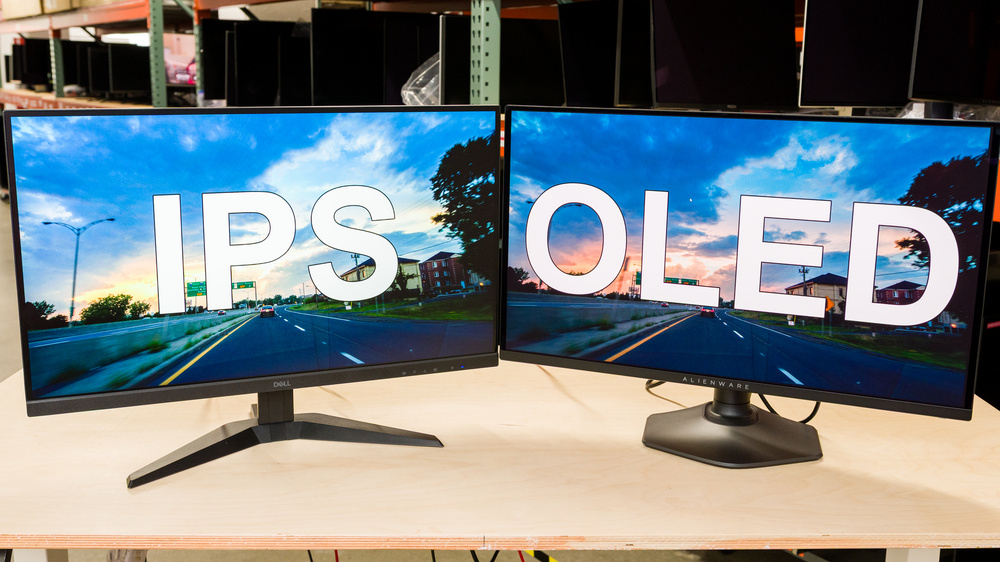
In the OLED vs IPS Display comparison, OLED is technologically more advanced because every pixel lights itself independently, enabling true blacks, infinite contrast, and superior visuals.
However, IPS still remains the practical choice for affordability, reliability, and everyday productivity.
OLED vs IPS Display Who Should Actually Buy What?
The answer to the OLED vs IPS Display debate depends entirely on your usage. OLED is not automatically better for everyone, and IPS is not outdated.
Instead of asking “Which display is best?”, ask “Which display is best for my needs?”
Students
IPS usually wins. Students often use browsers, PDFs, coding tools, Office apps, and long study sessions. IPS is affordable, reliable, and excellent for daily work.
Gamers
OLED wins for premium gaming. Faster response time, better HDR, richer colors, and deeper blacks make games look dramatically better.
Office & Business
IPS usually wins. Long Excel sessions, emails, spreadsheets, presentations, and productivity work are perfect for IPS displays.
Creators & Editors
OLED usually wins. Better contrast, richer colors, deeper blacks, and stronger HDR make OLED ideal for video editing and content creation.
Movie Lovers
OLED easily wins. Netflix, YouTube, HDR content, movies, and streaming look dramatically better on OLED displays.
Daily Users
IPS usually wins. If you browse, study, work, and stream casually, IPS gives excellent value without paying premium prices.
⚡ Quick Buying Advice
🌈 Buy OLED If…
- You love premium visuals
- You watch movies often
- You play games regularly
- You edit photos/videos
- You want the best HDR
💻 Buy IPS If…
- You want better value
- You study or work long hours
- You use Office daily
- You want reliability
- You prefer no burn-in risk
Related Laptop Guides
🚀 Master Your Laptop Knowledge
These guides will directly impact your laptop performance — skip them and you’ll likely regret your purchase.
8GB vs 16GB RAM
The biggest performance factor. Wrong choice = slow laptop.
Explore RAM →SSD vs HDD vs NVMe
This decides how fast your laptop feels every single day.
Compare Storage →i3 vs i5 vs i7 vs Ryzen
Understand real CPU performance before buying.
See Comparison →Laptop Buying Guide 2026
Complete system to choose the right laptop.
Start Guide →Best Laptops for Coding
For developers who need real performance.
Explore Coding →Best Laptops Under ₹50K
Small budget increase = massive performance gain.
See Options →